
SQL Injection in 2026: Is Your App Still Vulnerable? (Test It Now)
SQL injection has topped the OWASP vulnerability charts for over a decade. It still causes data breaches in 2026 — not because developers don't know about it, but because it keeps slipping through in edge cases. Here's how to find it and shut it down for good.
Last updated: July 2026 · 13 min read · Security
Legal notice: All techniques in this article are for testing and securing applications you own or have explicit written permission to test. Unauthorized testing of third-party systems is illegal in most jurisdictions. Always get permission first.
In 2026, SQL injection should be a solved problem. Modern frameworks, ORMs, and security tooling have made it easier than ever to write safe database queries. And yet it consistently appears in penetration test reports, bug bounty submissions, and breach post-mortems.
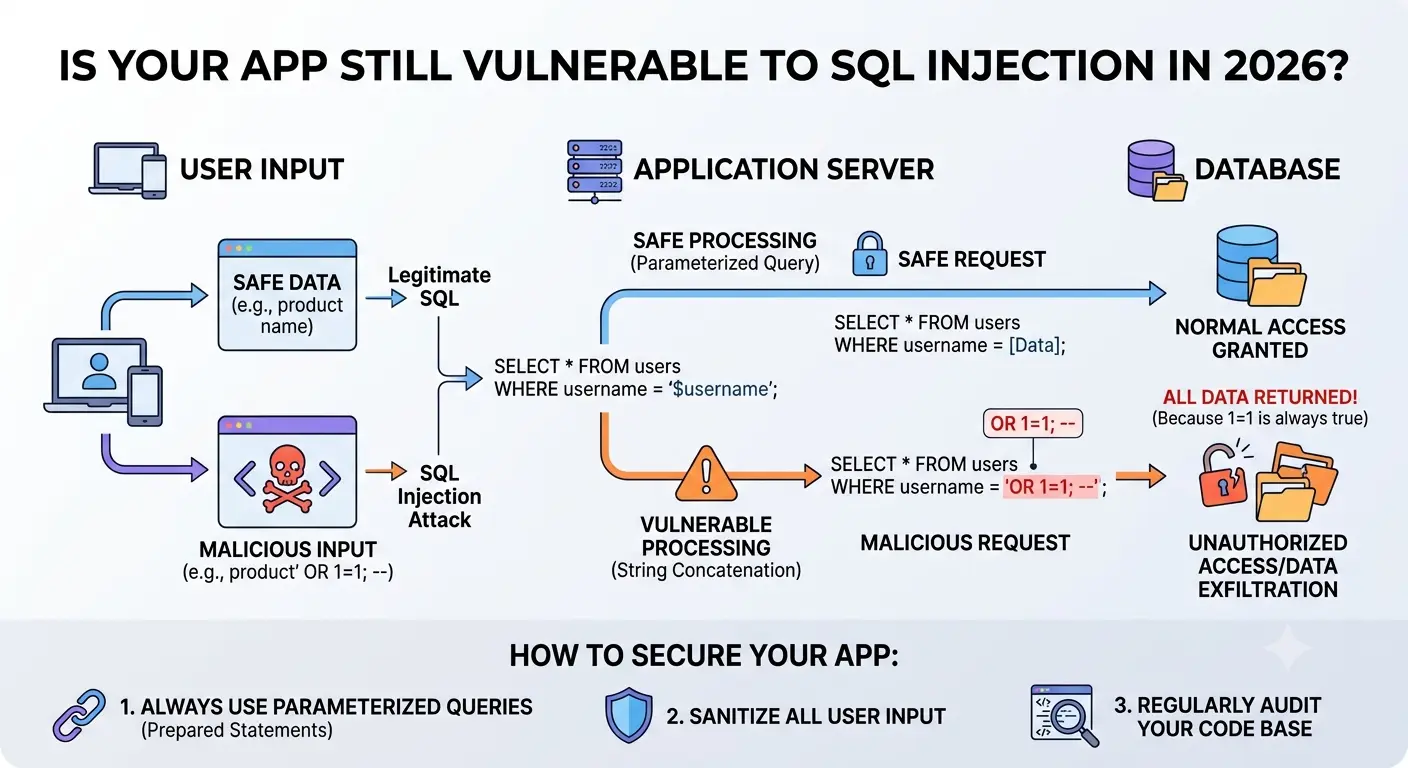
The reason isn't ignorance — most developers know what SQL injection is. The problem is that it tends to hide in the gaps: a legacy helper function, a dynamically built ORDER BY clause, a search feature that handles its own string interpolation, a raw query buried in an ORM's escape hatch. One overlooked input is enough.
This guide covers how SQL injection actually works, how to test your own application systematically, and how to fix every category of vulnerability with concrete code examples across Node.js, Python, and PHP.
What SQL Injection Actually Is
SQL injection happens when user-controlled input is included in a database query without being properly separated from the query structure. The database engine can't tell where the developer's intent ends and the attacker's input begins, so it executes both as a single query.
Here's the classic example, in Node.js with a raw MySQL query:
// ❌ VULNERABLE — never do this
const username = req.body.username; // attacker controls this
const query = "SELECT * FROM users WHERE username = '" + username + "'";
db.query(query);

// If username = "admin' OR '1'='1" the query becomes:
// SELECT * FROM users WHERE username = 'admin' OR '1'='1'
// This returns every row in the users table.

// If username = "admin'; DROP TABLE users; --" the query becomes:
// SELECT * FROM users WHERE username = 'admin'; DROP TABLE users; --'
// Depending on the database driver, this could execute both statements.
The vulnerability isn't specific to any language or database. It appears wherever string concatenation is used to build a SQL statement from user input — whether the query is written in JavaScript, Python, PHP, Ruby, Java, or Go.
The four main categories
| Type | How it works | Detectability |
|---|---|---|
| In-band (classic) | Results returned directly in the HTTP response | Easy — errors or data appear on screen |
| Union-based | UNION SELECT appended to extract data from other tables | Moderate — requires column count matching |
| Blind (boolean) | App behaviour changes (true/false) without error messages | Hard — requires many requests |
| Out-of-band | Data exfiltrated via DNS or HTTP requests from the DB server | Very hard — no visible response change |
Where SQL Injection Hides in Modern Apps
Most developers know to avoid string concatenation in login forms. The spots that get missed are subtler.
Dynamic ORDER BY and column names
Parameterized queries handle values safely, but they can't parameterize identifiers like column names or sort directions. This is one of the most common sources of injections in data-heavy dashboards:
// ❌ VULNERABLE — sort column comes from a query param
const sortBy = req.query.sort; // e.g. "created_at"
const query = `SELECT * FROM orders WHERE user_id = ? ORDER BY ${sortBy}`;

// Attacker sends: ?sort=(SELECT+password+FROM+users+LIMIT+1)
// The subquery executes and may leak data in the sort result
ORM raw query escape hatches
ORMs like Sequelize, TypeORM, Prisma, and SQLAlchemy are safe by default — until you drop into a raw query for performance or complex logic:
// ❌ VULNERABLE — Sequelize raw query with interpolation
const results = await sequelize.query(
  `SELECT * FROM products WHERE category = '${req.query.category}'`
);

// ❌ VULNERABLE — Prisma $queryRaw with template literal abuse
const results = await prisma.$queryRaw(
  `SELECT * FROM products WHERE name LIKE '%${searchTerm}%'`
);
Search and filter features
Full-text search, multi-column filters, and tag-based queries often involve building WHERE clauses dynamically. Each condition added programmatically is a potential injection point if the values aren't parameterized.
Stored procedures that concatenate internally
Moving SQL logic into a stored procedure doesn't automatically make it safe. If the procedure uses dynamic SQL — building a query string from parameters and executing it with EXEC or EXECUTE IMMEDIATE — it can be just as vulnerable as application-level concatenation.
Second-order injection
This one catches developers off-guard. An attacker submits a malicious string that gets stored safely in the database, then later retrieved and inserted unsafely into a second query. The first insertion looks clean; the exploit triggers later when the stored value is reused.
How to Test Your App for SQL Injection
Testing is most effective when you combine manual probing with automated scanning. Start with manual checks on high-risk inputs, then run a tool to catch things you missed.
Step 1: Map every input surface
Before you test anything, document every place your application accepts user input that could reach a database query. This includes:
- Form fields (login, registration, search, filters, profile edit)
- URL path segments and query parameters
- HTTP headers (User-Agent, Referer, X-Forwarded-For — yes, some apps log these to a DB)
- JSON body fields in API endpoints
- Cookie values
- File upload metadata (filename, content-type)
Step 2: Manual probing with basic payloads
For each input, try a few simple payloads and observe the response — errors, timing changes, different content, or HTTP status changes all indicate something worth investigating further.
# Single quote — triggers a syntax error if vulnerable
'

# Always-true condition
' OR '1'='1
' OR 1=1--
1 OR 1=1

# Comment sequences to truncate the rest of the query
'--
'#
';--

# Sleep-based blind test (MySQL) — response delays ~5 seconds if vulnerable
' OR SLEEP(5)--

# Sleep-based blind test (PostgreSQL)
'; SELECT pg_sleep(5)--

# Sleep-based blind test (MSSQL)
'; WAITFOR DELAY '0:0:5'--

# Boolean test — compare responses for true vs false conditions
' AND 1=1--   (should behave normally)
' AND 1=2--   (should return empty / different response)
What to look for: Database error messages, changes in response length, timing delays, or different content when the condition changes from true to false. Any of these signals a likely injection point.
Step 3: Automated scanning with sqlmap
sqlmap is the standard open-source tool for automated SQL injection detection and exploitation. Run it against your staging environment (never production without a maintenance window and proper backups):
# Basic scan on a URL with a parameter
sqlmap -u "https://staging.yourapp.com/products?id=1"

# Scan a POST form
sqlmap -u "https://staging.yourapp.com/login"   --data="username=test&password=test"   --level=3 --risk=2

# Scan with a session cookie (for authenticated endpoints)
sqlmap -u "https://staging.yourapp.com/api/orders?filter=recent"   --cookie="session=your_session_token_here"   --batch  # non-interactive mode

# Focus on a specific parameter
sqlmap -u "https://staging.yourapp.com/search?q=shoes&sort=price"   -p sort  # only test the 'sort' parameter
sqlmap will automatically detect the database type, test multiple injection techniques, and report exactly what it found. The --level and --risk flags control how aggressively it tests — start low and increase if initial scans come back clean.
Step 4: Code review for vulnerable patterns
Grep your codebase for the patterns that are most likely to produce vulnerabilities. In a Node.js project:
# Find raw string concatenation in queries
grep -rn "querys*=.*+s*req." src/
grep -rn "`SELECT.*${" src/
grep -rn "`INSERT.*${" src/

# Find raw() calls in ORMs — always warrant a close look
grep -rn "$queryRaw|sequelize.query|knex.raw|.raw(" src/

# Find ORDER BY with dynamic values
grep -rn "ORDER BY.*req." src/
grep -rn "ORDER BY.*${" src/
Each hit isn't necessarily a vulnerability, but each one deserves a manual review to confirm the input is properly handled.
How to Fix SQL Injection: Defence in Depth
There is no single silver bullet. Proper defence combines a primary fix (parameterized queries) with secondary controls (input validation, least privilege, WAF) so that a lapse in one layer doesn't become a breach.
Fix #1: Parameterized queries (the non-negotiable baseline)
Parameterized queries — also called prepared statements — separate the SQL structure from the data. The database driver handles escaping; there's no string to inject into.
Node.js (mysql2)
// ❌ Vulnerable
const query = "SELECT * FROM users WHERE email = '" + email + "'";

// ✅ Fixed — placeholders replace the value, never the structure
const [rows] = await db.execute(
  "SELECT * FROM users WHERE email = ?",
  [email]
);
Python (psycopg2 / PostgreSQL)
# ❌ Vulnerable
cursor.execute(f"SELECT * FROM users WHERE email = '{email}'")

# ✅ Fixed — %s is a placeholder, not string formatting
cursor.execute("SELECT * FROM users WHERE email = %s", (email,))
PHP (PDO)
// ❌ Vulnerable
$query = "SELECT * FROM users WHERE email = '$email'";
$result = $pdo->query($query);

// ✅ Fixed
$stmt = $pdo->prepare("SELECT * FROM users WHERE email = :email");
$stmt->execute([':email' => $email]);
$result = $stmt->fetchAll();
Fix #2: Safe ORM usage
ORMs are safe by default — when you use them correctly. The risk comes from raw query escape hatches. Here's the safe pattern for each:
// Prisma — use $queryRaw with tagged template literals (safe)
const results = await prisma.$queryRaw`
  SELECT * FROM products WHERE name LIKE ${searchTerm + '%'}
`;
// Prisma automatically parameterizes tagged template values

// Sequelize — pass replacements object, not string interpolation
const results = await sequelize.query(
  "SELECT * FROM products WHERE category = :category",
  { replacements: { category: req.query.category }, type: QueryTypes.SELECT }
);

// TypeORM — use query builder, not raw template strings
const products = await dataSource
  .getRepository(Product)
  .createQueryBuilder("product")
  .where("product.category = :category", { category: req.query.category })
  .getMany();
Fix #3: Handling dynamic identifiers (ORDER BY, column names)
When you legitimately need to allow users to choose a sort column or direction, you cannot parameterize the identifier itself. The safe approach is an allowlist:
// ✅ Allowlist approach — only permit known-safe column names
const ALLOWED_SORT_COLUMNS = new Set(["created_at", "price", "name", "rating"]);
const ALLOWED_DIRECTIONS = new Set(["ASC", "DESC"]);

function buildSafeOrderBy(column, direction) {
  const safeColumn = ALLOWED_SORT_COLUMNS.has(column) ? column : "created_at";
  const safeDir = ALLOWED_DIRECTIONS.has(direction?.toUpperCase()) ? direction.toUpperCase() : "DESC";
  return `ORDER BY ${safeColumn} ${safeDir}`; // safe — values come from our allowlist
}

const orderBy = buildSafeOrderBy(req.query.sort, req.query.dir);
const [rows] = await db.execute(
  `SELECT * FROM products WHERE category = ? ${orderBy}`,
  [req.query.category]
);
Fix #4: Principle of least privilege
Even if an attacker finds an injection point, the blast radius depends on what your database user is allowed to do. If the app connects as a superuser, an attacker can read every table, write data, and potentially execute OS commands. The fix is simple:
- Create a dedicated database user for your application.
- Grant it only the permissions it actually needs: SELECT, INSERT, UPDATE, DELETE on specific tables.
- Never grant DROP, CREATE, ALTER, or FILE permissions to the application user.
- Use a separate, more-privileged user only for migrations, run from a controlled environment.
-- PostgreSQL: create a restricted application user
CREATE USER app_user WITH PASSWORD 'strong_random_password';

-- Grant only what the app needs
GRANT SELECT, INSERT, UPDATE, DELETE ON ALL TABLES IN SCHEMA public TO app_user;
GRANT USAGE, SELECT ON ALL SEQUENCES IN SCHEMA public TO app_user;

-- Explicitly deny dangerous operations (belt and suspenders)
REVOKE CREATE ON SCHEMA public FROM app_user;
Fix #5: Input validation as a secondary control
Input validation is not a substitute for parameterized queries — never rely on it alone. But it is a valuable secondary layer that can catch obvious attacks before they reach the database layer at all.
import { z } from "zod";

// Validate and shape inputs before they touch any query
const ProductQuerySchema = z.object({
  category: z.string().max(50).regex(/^[a-zA-Z0-9_-]+$/),
  minPrice: z.coerce.number().min(0).max(1_000_000).optional(),
  sort: z.enum(["price", "name", "created_at", "rating"]).default("created_at"),
  dir: z.enum(["asc", "desc"]).default("desc"),
  page: z.coerce.number().int().min(1).default(1),
});

// In your route handler:
const parsed = ProductQuerySchema.safeParse(req.query);
if (!parsed.success) {
  return res.status(400).json({ errors: parsed.error.flatten().fieldErrors });
}
// Now use parsed.data — structurally validated, expected types guaranteed
Fix #6: Web Application Firewall (WAF) as a last line of defense
A WAF (Cloudflare, AWS WAF, ModSecurity) can detect and block common SQL injection patterns in incoming requests. This is not a replacement for fixing code — a determined attacker can bypass WAF rules — but it provides a useful safety net and reduces automated attack noise.
Enable WAF rules for OWASP Top 10 on all public-facing endpoints. Review blocked requests regularly; false positives on legitimate traffic are common and need to be tuned.
Defence Layers: What Each One Does (and Doesn't) Protect Against
| Layer | Stops | Doesn't stop | Priority |
|---|---|---|---|
| Parameterized queries | In-band, union, blind SQLi | Second-order if re-inserted unsafely | 🔴 Required |
| Input allowlisting | Malformed or unexpected data | Valid-looking malicious input | 🟠 High |
| Least-privilege DB user | Data exfiltration, schema changes | Read-only data exposure | 🟠 High |
| WAF rules | Automated attacks, common patterns | Custom or obfuscated payloads | 🟡 Medium |
| Error suppression | Info leakage from DB errors | The injection itself | 🟡 Medium |
| Regular code audits | Regressions, new attack surfaces | Existing unknown vulns | 🟡 Medium |
Stop Leaking Database Errors to Users
A detailed database error message in a production response hands attackers exactly the information they need to refine an injection attack — the database type, table structure, column names, and query fragments.
// ❌ What an attacker sees when errors leak:
// "You have an error in your SQL syntax near ''admin'' at line 1 (MySQL)"
// "column "userame" does not exist (PostgreSQL)"
// "ORA-00907: missing right parenthesis (Oracle)"

// ✅ What the response should say in production:
// { "error": "Something went wrong. Please try again." }

// In Express — generic error handler
app.use((err, req, res, next) => {
  // Log the full error internally
  console.error(err);

  // Return nothing useful to the client
  res.status(500).json({ error: "An unexpected error occurred." });
});
Log full errors server-side (to a log aggregation service like Datadog, Sentry, or CloudWatch), but never return database-level detail to the client. This applies in development too — get in the habit early.
Integrating SQL Injection Testing Into Your CI/CD Pipeline
A one-time security audit is better than nothing, but vulnerabilities get introduced with new code every day. The more effective approach is to bake security checks into the development workflow so regressions are caught before they reach production.
Static analysis (SAST)
Static analysis tools scan source code for vulnerable patterns without running the application. Add them to your pre-commit hooks or CI pipeline:
- Semgrep — fast, rule-based, works on most languages. Free tier covers SQL injection patterns.
- Snyk Code — broader vulnerability detection with GitHub/GitLab integration.
- ESLint + eslint-plugin-security — catches some dangerous patterns in Node.js at lint time.
- Bandit — Python-specific, flags SQL string concatenation directly.
# Example: Semgrep SQL injection ruleset in CI
# .github/workflows/security.yml

- name: Run Semgrep
  uses: semgrep/semgrep-action@v1
  with:
    config: "p/sql-injection"  # official Semgrep SQL injection ruleset
Dynamic testing (DAST) in staging
Run sqlmap or OWASP ZAP against your staging environment as part of a nightly or pre-release pipeline. This catches injection points that static analysis can't see — issues that only appear at runtime based on how data flows through the system.
# sqlmap in CI — scan a list of URLs after deployment to staging
sqlmap   --url="https://staging.yourapp.com/api/products?id=1"   --batch   --level=2   --risk=1   --output-dir=./sqlmap-results   --format=json

# Fail the pipeline if sqlmap finds anything
if grep -q '"vulnerable": true' ./sqlmap-results/**/*.json; then
  echo "SQL injection vulnerability detected!"
  exit 1
fi
Why SQL Injection Still Causes Breaches in 2026
Given how well-understood this vulnerability is, why does it keep appearing in breach reports? A few consistent patterns explain it:
- →Legacy code nobody touches: Old query-building helpers written before ORMs were standard. Nobody refactors them because they "work," until they don't.
- →Third-party integrations: Plugins, libraries, and CMS extensions that handle their own database layer. You trust the vendor; the vendor's code is vulnerable.
- →Developer fatigue on boring inputs: Login forms get scrutinized; reporting filters and admin panels don't. Attackers know this.
- →ORMs give a false sense of security: Teams assume the ORM handles everything, then drop into a raw query for one specific feature without realizing the risk.
- →No regression testing for security: A safe query gets refactored into an unsafe one by a new developer. If there's no security test for it, nobody notices until a scanner finds it.
SQL Injection Security Checklist
Use this as a starting point for a security review. Check each item for every database interaction in your application.
Frequently Asked Questions
Does using an ORM mean I'm safe from SQL injection?
Not automatically. ORMs are safe when used through their standard query-builder interfaces. They become unsafe when you use raw query methods with string interpolation. Always prefer the typed query builder; use raw queries only when necessary and with explicit parameterization.
Is NoSQL safe from injection attacks?
NoSQL databases are not vulnerable to traditional SQL injection, but they have their own injection classes. MongoDB is susceptible to operator injection ($where, $gt) if user input is merged directly into query objects. The same principle applies: never merge raw user input into a query structure.
Can I just escape special characters instead of using parameterized queries?
Escaping is fragile and context-dependent. Different databases escape differently; character set edge cases have bypassed escaping in the past; and it's easy to forget a single call. Parameterized queries are mechanically safer because the database driver handles the separation — not your escaping logic. Escaping is not an acceptable primary defence.
How do I test for second-order SQL injection?
Second-order injection is harder to test with automated tools because it requires understanding data flow across multiple requests. The approach is:
- Submit a malicious payload to an input that gets stored (registration, profile update, etc.)
- Trigger any feature that retrieves and uses that stored value in a query
- Observe whether the payload executed
Code review is more effective than dynamic scanning for finding second-order injection. Look for places where stored values are retrieved and used in query construction without re-parameterizing.
What should I do if I find an SQL injection in my own app?
First, assess whether it's been exploited — check database logs and access logs for unusual query patterns. Patch the vulnerable code immediately using parameterized queries. If there's any possibility data was accessed or exfiltrated, follow your incident response plan and legal obligations, which may include breach notification depending on your jurisdiction and the type of data involved.
The Bottom Line
SQL injection has been preventable for decades. The fix — parameterized queries — is well-documented, straightforward to implement, and supported by every mainstream database library. The work required to prevent it is substantially less than the work required to recover from a breach.
The goal isn't to test your app once and declare it clean. It's to build habits and tooling that make vulnerable patterns hard to introduce in the first place: an ORM that defaults to safety, a linter that flags raw queries, a CI pipeline that scans before deployment, and a team that knows which corners to look in.
Three things to do today:
- Grep your codebase for string interpolation in SQL queries and fix every hit.
- Run sqlmap against your staging environment and review the output.
- Add Semgrep's SQL injection ruleset to your CI pipeline.

Cybersecurity & Tech Research Team
The Kodivio team covers cybersecurity best practices, threat analysis, and digital safety tools based on hands-on testing and industry sources.
Learn more about us →