
How to Use GitHub Actions Secrets Safely in CI/CD Pipelines
A leaked production secret in a CI/CD log can cause more damage than almost any other security incident. This guide covers exactly how GitHub Actions secrets work under the hood, where they leak, and how to structure your pipelines so they can't.
How GitHub Actions Secrets Work
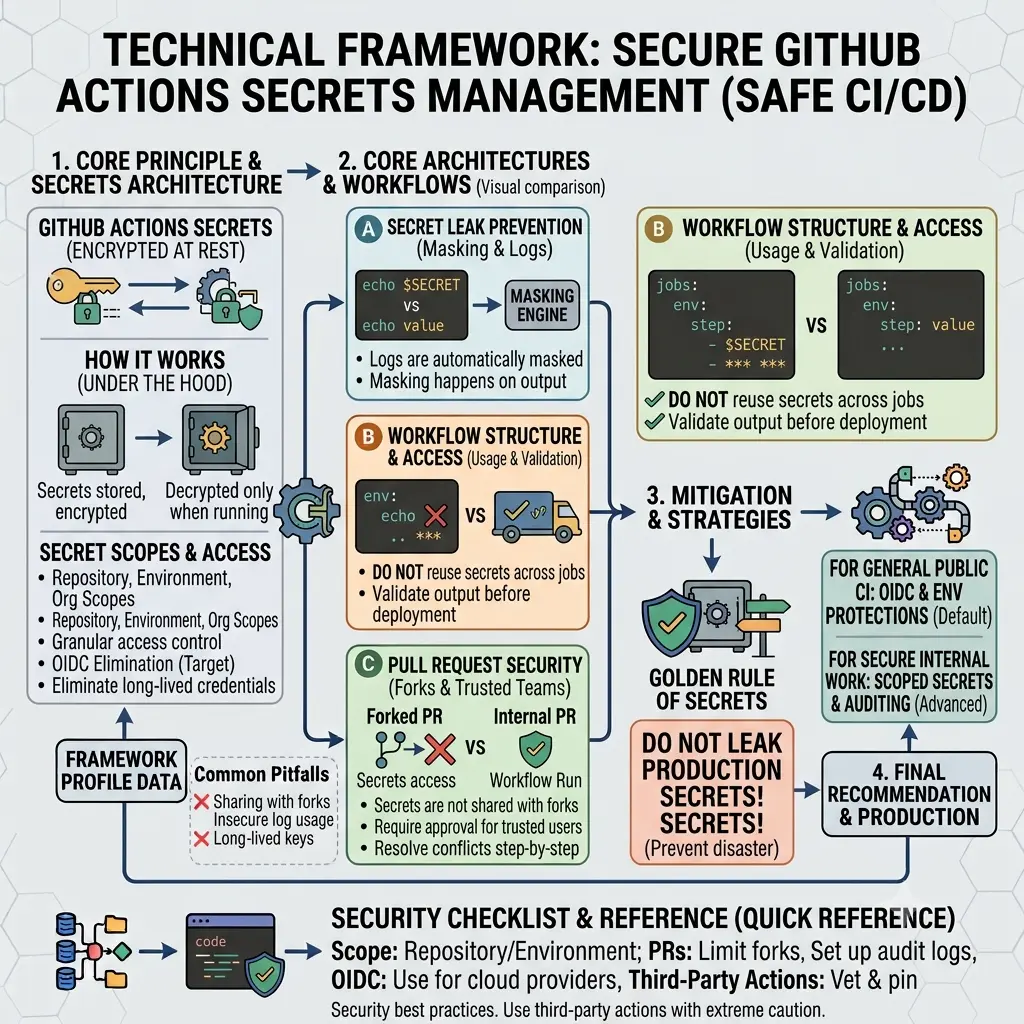
GitHub Actions secrets are encrypted key-value pairs stored at the repository, environment, or organization level. When a workflow runs, GitHub injects the secret's value into the runner environment. The value is never written to disk in plaintext — it exists only in memory during the job that needs it.
The most important thing to understand about secrets is how GitHub protects them in logs: any string that matches a stored secret value is automatically masked with *** in workflow run logs. This is the primary defense against accidental exposure in output.
That masking has limits, though. It only masks exact string matches. A secret that gets base64-encoded, URL-encoded, or split across multiple log lines can slip through. The masking is a safety net, not a license to be careless.
What GitHub guarantees about secrets
- Secrets are encrypted at rest using libsodium sealed boxes.
- Secret values are never returned via the API after creation — not even to repo admins.
- Secrets are not passed to workflows triggered by forks (with important exceptions covered later).
- Secret values are masked in workflow logs when they appear verbatim.
- Secrets are only available to jobs that explicitly reference them.
Secret Scopes: Repository, Environment, and Organization
Secrets can be stored at three levels, and choosing the right level is the foundation of a well-scoped secrets strategy.
| Scope | Available to | Best for | Set via |
|---|---|---|---|
| Repository | All workflows in that repo | Repo-specific credentials (deploy key, npm token) | Settings → Secrets → Actions |
| Environment | Jobs that target that environment | Production vs staging credentials; requires approval gate | Settings → Environments → Secrets |
| Organization | Selected or all repos in the org | Shared credentials (Docker Hub, Slack webhook, Snyk token) | Org Settings → Secrets → Actions |
Principle of least privilege for secrets
Every secret should be scoped to the smallest context that needs it. A production database password should be an environment secret on the production environment — not a repository secret available to every workflow, including those triggered by PRs. An npm publish token for one package shouldn't be an organization secret visible to 50 repositories.
When a secret leaks, its blast radius is determined by its scope. A repository secret leaks access to that repository's resources. An organization secret with broad repo access can leak access to everything.
Using Secrets in Workflows Correctly
Secrets are referenced in workflow YAML using the ${{ secrets.SECRET_NAME }} syntax. They can be passed as environment variables, step inputs, or command arguments — with significant security differences between these approaches.
The right way: environment variables
jobs:
  deploy:
    runs-on: ubuntu-latest
    steps:
      - name: Deploy to production
        env:
          # Pass secrets as environment variables to the step
          DATABASE_URL: ${{ secrets.DATABASE_URL }}
          API_KEY: ${{ secrets.DEPLOY_API_KEY }}
        run: |
          ./deploy.sh
Environment variables are the safest way to consume secrets in shell scripts. The value isn't passed as a command-line argument (which would be visible in process listings) and isn't hardcoded into the script.
What to avoid: command-line arguments
# ❌ NEVER do this — secret visible in process list and potentially in logs
- run: ./deploy.sh --api-key ${{ secrets.API_KEY }}

# ❌ Also bad — secret interpolated into the run command directly
- run: curl -H "Authorization: Bearer ${{ secrets.TOKEN }}" https://api.example.com
# ✅ Correct — secret passed via environment variable
- name: Call API
env:
AUTH_TOKEN: ${{ secrets.TOKEN }}
run: curl -H "Authorization: Bearer $AUTH_TOKEN" https://api.example.comPassing secrets between jobs
Secrets cannot be passed directly between jobs through outputs — and this is intentional. Each job that needs a secret must reference it directly from secrets. Never store a secret in a job output, artifact, or cache — those persist beyond the job lifetime and may be accessible to untrusted workflows.
jobs:
  build:
    runs-on: ubuntu-latest
    steps:
      - run: echo "Building..."
      # ❌ Don't do this — saves secret to artifact
      # - run: echo "${{ secrets.API_KEY }}" > key.txt
      # - uses: actions/upload-artifact@v4
      #   with: { name: key, path: key.txt }

  deploy:
    needs: build
    runs-on: ubuntu-latest
    steps:
      - name: Deploy
        env:
          # ✅ Each job references secrets directly
          API_KEY: ${{ secrets.API_KEY }}
        run: ./deploy.sh
Using secrets with reusable workflows
Reusable workflows can accept secrets as explicit inputs using the secrets keyword, or you can pass them using secrets: inherit to forward all secrets from the caller. Use explicit passing where possible — it makes the secret dependencies of a reusable workflow visible and auditable.
# caller workflow
jobs:
  call-deploy:
    uses: ./.github/workflows/deploy.yml
    secrets:
      deploy_token: ${{ secrets.DEPLOY_TOKEN }}
      # Explicit is better than: secrets: inherit

# reusable workflow (deploy.yml)
on:
  workflow_call:
    secrets:
      deploy_token:
        required: true

jobs:
  deploy:
    runs-on: ubuntu-latest
    steps:
      - env:
          TOKEN: ${{ secrets.deploy_token }}
        run: ./deploy.sh
How Secrets Leak — and How to Prevent Each
Most secret leakage in CI/CD isn't from sophisticated attacks. It's from predictable mistakes that are easy to prevent once you know what they are.
Printing secrets in debug output
How it happens: A developer adds `echo $DATABASE_URL` to debug a connection issue. If the secret value isn't masked (e.g., it was transformed first), it appears in the public log.
Prevention: Never echo secret values directly. Use `echo "DB configured: $(echo $DATABASE_URL | cut -d@ -f2)"` to log the host without the credentials. If you need to debug a connection string, log only the non-sensitive parts.
Secrets in error messages and stack traces
How it happens: A connection failure logs the full connection string including credentials. A failed API call logs the request headers including the Authorization token.
Prevention: Use structured logging that separates configuration from credentials. Configure your application and CLI tools to not include auth headers in error output. Many SDKs have a 'redact credentials from errors' option — enable it.
Base64 or URL-encoded secrets bypass masking
How it happens: GitHub's log masking matches the exact secret value. If your workflow base64-encodes a secret (e.g., for a Docker registry config) and then echoes it, the encoded form is not masked.
Prevention: Add additional masks using `::add-mask::` for any derived forms of a secret that will appear in logs.
Secrets stored in artifacts or caches
How it happens: A workflow writes environment variables (including secrets) to a `.env` file and uploads it as an artifact for debugging. Artifacts persist and may be downloadable by anyone with read access to the repo.
Prevention: Never write secrets to files that get uploaded as artifacts or stored in the cache. Audit your artifact upload steps to confirm they don't include hidden config files.
Compromised third-party action
How it happens: A third-party action that has access to `secrets` context (via `with` or `env`) is updated with malicious code that exfiltrates secret values to an external endpoint.
Prevention: Pin third-party actions to a specific commit SHA, not a tag. Tags are mutable — a compromised maintainer can move a tag to malicious code. SHA pins are immutable. More in the third-party actions section below.
Secret leakage via pull request workflows
How it happens: A `pull_request_target` workflow runs with write permissions and has access to secrets, but it checks out and runs code from the fork — giving the fork's code access to production secrets.
Prevention: Covered in detail in the PR security section. Never use `pull_request_target` to run untrusted code with secrets access.
Adding custom masks for derived values
- name: Configure Docker registry
  env:
    REGISTRY_PASSWORD: ${{ secrets.REGISTRY_PASSWORD }}
  run: |
    # Create the encoded form
    ENCODED=$(echo -n "user:$REGISTRY_PASSWORD" | base64)

    # Mask the encoded form too — GitHub won't do this automatically
    echo "::add-mask::$ENCODED"

    # Now safe to use in subsequent steps
    docker login -u user -p "$REGISTRY_PASSWORD" registry.example.com
Pull Request Security and Fork Risks
Pull requests from forks are one of the highest-risk surfaces in GitHub Actions. Understanding the difference between pull_request and pull_request_target is critical.
| Trigger | Runs workflow from | Secrets access | Write permission |
|---|---|---|---|
| pull_request (from fork) | Fork's code | ❌ No secrets | ❌ Read-only token |
| pull_request (from branch) | Base repo | ✅ Secrets available | ✅ Write token |
| pull_request_target (any) | Base repo (target) | ✅ Secrets available | ✅ Write token |
The dangerous pattern: pull_request_target + checkout fork code
# ❌ CRITICAL VULNERABILITY — do not do this
on: pull_request_target

jobs:
  test:
    runs-on: ubuntu-latest
    steps:
      # This checks out the FORK's code, which has write permissions
      # and secrets access from pull_request_target
      - uses: actions/checkout@v4
        with:
          ref: ${{ github.event.pull_request.head.sha }}
      - run: npm test  # Fork's malicious test script runs with your secrets
This is one of the most commonly exploited GitHub Actions vulnerabilities. An attacker submits a PR with a modified test script that exfiltrates secrets, and pull_request_target gives that script full secrets access.
Safe pattern: separate workflows for trusted and untrusted code
# Workflow 1: runs on pull_request (no secrets, runs fork code safely)
on: pull_request
jobs:
  build-and-test:
    runs-on: ubuntu-latest
    steps:
      - uses: actions/checkout@v4
      - run: npm ci && npm test
      # Upload test results as artifact for the trusted workflow to use
      - uses: actions/upload-artifact@v4
        if: always()
        with:
          name: test-results
          path: test-results/

---

# Workflow 2: runs on workflow_run (has secrets, only runs trusted code)
on:
  workflow_run:
    workflows: ["CI"]    # name of workflow 1
    types: [completed]

jobs:
  comment-results:
    if: github.event.workflow_run.conclusion == 'success'
    runs-on: ubuntu-latest
    steps:
      - uses: actions/download-artifact@v4
        with:
          name: test-results
          github-token: ${{ secrets.GITHUB_TOKEN }}
          run-id: ${{ github.event.workflow_run.id }}
      # Now safe to use secrets for posting results, deploying previews, etc.
      - env:
          DEPLOY_TOKEN: ${{ secrets.DEPLOY_TOKEN }}
        run: ./post-deploy-preview.sh
The split-workflow pattern is the recommended approach for public repos that need to do something privileged (post a comment, deploy a preview, update a status check) in response to fork PRs — without giving the fork's code access to secrets.
OIDC: Eliminating Long-Lived Secrets Entirely
The best secret is one that doesn't exist. OpenID Connect (OIDC) lets GitHub Actions workflows authenticate directly to cloud providers — AWS, GCP, Azure, Vault — without any stored secrets. Instead of a long-lived access key, the workflow gets a short-lived token that expires when the job ends.
This is a significant security improvement. A stolen long-lived AWS access key can be used indefinitely. A stolen OIDC token from a completed job is already expired and useless.
How OIDC works with AWS (example)
- You configure an IAM Identity Provider in AWS that trusts GitHub's OIDC endpoint.
- You create an IAM role with a trust policy that allows specific GitHub repos/branches/environments to assume it.
- In your workflow, you request a short-lived token from GitHub's OIDC provider.
- GitHub's token is exchanged for AWS temporary credentials via STS.
- The credentials expire when the job ends. Nothing is stored in GitHub secrets.
jobs:
  deploy:
    runs-on: ubuntu-latest
    # Required permissions for OIDC token request
    permissions:
      id-token: write
      contents: read

    steps:
      - uses: actions/checkout@v4

      - name: Configure AWS credentials via OIDC
        uses: aws-actions/configure-aws-credentials@v4
        with:
          role-to-assume: arn:aws:iam::123456789012:role/GitHubActionsDeployRole
          aws-region: us-east-1
          # No AWS_ACCESS_KEY_ID or AWS_SECRET_ACCESS_KEY needed

      - name: Deploy to S3
        run: aws s3 sync ./dist s3://my-bucket/
Scoping the IAM trust policy tightly
The trust policy on your IAM role determines which GitHub workflows can assume it. Always restrict to the specific repository and branch that legitimately needs the access:
{
  "Condition": {
    "StringEquals": {
      "token.actions.githubusercontent.com:aud": "sts.amazonaws.com",
      "token.actions.githubusercontent.com:sub":
        "repo:myorg/myrepo:environment:production"
    }
  }
}
Using environment:production in the sub claim means only jobs targeting the production environment can assume this role — combining OIDC with environment protection rules for defense in depth.
OIDC is available for AWS, GCP, Azure, HashiCorp Vault, and many other providers. For any cloud deployment, migrating from stored access keys to OIDC is the highest-impact single security improvement you can make to your CI/CD pipeline.
Environment Protection Rules
GitHub Environments add a protection layer between your workflow and your most sensitive secrets. A job targeting an environment can be required to pass specific checks before it runs — most importantly, manual approval.
Configure environments under Settings → Environments. Key protection options:
- Required reviewers: One or more people must approve the deployment before the job accessing production secrets runs. Even if a malicious workflow reaches the deploy step, it waits for human approval.
- Wait timer: A minimum delay before the environment's secrets become accessible. Gives time to notice and cancel a suspicious deployment.
- Deployment branches: Restrict which branches can deploy to the environment. Only
mainshould ever touch production secrets.
jobs:
  deploy-production:
    runs-on: ubuntu-latest
    # This job can only access production secrets after:
    # 1. A required reviewer approves it in the GitHub UI
    # 2. The deployment branch restriction passes (only main)
    environment:
      name: production
      url: https://myapp.com

    steps:
      - name: Deploy
        env:
          # This secret only exists in the production environment
          DB_PASSWORD: ${{ secrets.PROD_DB_PASSWORD }}
        run: ./deploy-prod.sh
Environments are free on public repositories and available on GitHub Team and Enterprise for private repositories. For any production deployment, using an environment with required reviewers is a non-negotiable control.
Third-Party Actions and Supply Chain Risk
Every third-party action you use in a workflow that has access to secrets is a potential supply chain attack vector. In 2024 and 2025, several high-profile CI/CD compromises involved malicious code injected into popular actions.
Pin actions to commit SHAs, not tags
# ❌ Tag reference — mutable, can be changed to point to malicious code
- uses: actions/checkout@v4

# ✅ SHA pin — immutable, immune to tag manipulation
- uses: actions/checkout@11bd71901bbe5b1630ceea73d27597364c9af683 # v4.2.2
Yes, SHA pins are ugly. They require updating manually when you want a new version. That's a small price for knowing that the code you approved at review time is exactly the code that runs in production. Tools like Dependabot and pin-github-action can automate SHA management.
Restrict permissions at the workflow and job level
The default GITHUB_TOKEN permissions vary by repository settings. Explicitly declare minimal permissions at the top of every workflow and override at the job level where needed:
# Top-level: deny everything by default
permissions: read-all

jobs:
  test:
    runs-on: ubuntu-latest
    # No additional permissions needed — uses default read-all
    steps:
      - uses: actions/checkout@<SHA>
      - run: npm test

  deploy:
    runs-on: ubuntu-latest
    permissions:
      # Only grant what this specific job needs
      id-token: write    # OIDC token
      contents: read     # checkout
      deployments: write # update deployment status
    steps:
      - uses: actions/checkout@<SHA>
      - run: ./deploy.sh
Prefer official and verified actions
GitHub marks action publishers as "Verified Creator" when they've passed a verification process. Actions from actions/, aws-actions/, google-github-actions/, and similar verified publishers have a higher baseline of trust. For actions from unverified publishers, read the source code before using them in any workflow that has secrets access.
Consider an internal actions mirror
Larger organizations often maintain an internal fork of approved third-party actions, reviewed and pinned by the security team. Workflows use the internal fork rather than the public action directly. This adds review overhead but eliminates upstream supply chain risk entirely.
Secret Rotation and Auditing
Regular rotation
Secrets that never rotate are a liability that compounds over time. Every person who ever had access to a secret, every system that ever received it, and every log that ever captured it becomes a potential leak source. Rotation limits the useful lifetime of any leaked value.
Practical rotation cadences:
- Deploy tokens and API keys: every 90 days at minimum
- After any suspected compromise: immediately
- After a team member with access departs: immediately
- After a third-party action is updated (if you use tag refs): review the update before rotating
OIDC removes the rotation burden entirely for cloud credentials — another reason to prefer it over stored keys.
Auditing secret access
GitHub's audit log (available at the organization level) records secret creation, updates, and deletion. It does not record which workflow runs accessed which secrets — for that level of visibility, you need to integrate with an external secrets manager like HashiCorp Vault or AWS Secrets Manager, which provides access logs per secret.
# Fetching org audit log events related to secrets via GitHub API
curl -H "Authorization: Bearer $GITHUB_TOKEN"   "https://api.github.com/orgs/myorg/audit-log?phrase=action:org.create_actions_secret"

# Events to monitor:
# org.create_actions_secret
# org.update_actions_secret
# org.remove_actions_secret
# repo.create_actions_secret
# environment.create_actions_secret
GitHub secret scanning
GitHub secret scanning automatically detects common secret formats (AWS keys, Stripe keys, GitHub tokens, and 200+ other patterns) in pushes to repositories. Enable it under Settings → Code security. Push protection goes further — it blocks pushes that contain detected secrets before they're ever committed.
These features catch accidental commits of secrets to source control, which is a separate problem from workflow secret handling but equally important.
Security Checklist
Secrets Configuration
- ☐Secrets scoped to the smallest context needed (env > repo > org)
- ☐Production secrets in environment secrets, not repository secrets
- ☐Environment protection rules with required reviewers on production
- ☐Deployment branch restrictions on production environment
- ☐OIDC used for cloud provider authentication (no stored keys)
- ☐Secret rotation cadence documented and scheduled
Workflow Security
- ☐permissions: read-all set at workflow level with job-level overrides
- ☐Third-party actions pinned to commit SHAs
- ☐No pull_request_target workflows that checkout untrusted code with secrets
- ☐Secrets passed as env vars, never as command-line arguments
- ☐No secrets written to artifacts, caches, or job outputs
- ☐add-mask used for any derived/encoded forms of secrets
Monitoring & Response
- ☐GitHub secret scanning enabled with push protection
- ☐Org audit log monitored for secret create/update/delete events
- ☐Incident response plan for leaked secrets (rotation, revocation, review)
- ☐Alerts configured if OIDC role is assumed from unexpected contexts
Supply Chain
- ☐Only verified or internally reviewed third-party actions in use
- ☐Dependabot or equivalent configured for action version updates
- ☐Action SHA pins documented with version comments
- ☐Process for reviewing action updates before unpinning to new SHA
Key Takeaways
- ✓ Scope every secret to the smallest context that needs it — environment beats repository beats organization.
- ✓ GitHub's log masking only catches verbatim secret values — use
::add-mask::for encoded forms. - ✓ Never use
pull_request_targetto run fork code when secrets are in scope. - ✓ OIDC eliminates long-lived cloud credentials entirely — migrate from stored access keys where possible.
- ✓ Production environments need required reviewers and deployment branch restrictions.
- ✓ Pin third-party actions to commit SHAs, not tags — tags are mutable.
- ✓ Set
permissions: read-allat the workflow level and grant only what each job needs. - ✓ Enable secret scanning with push protection to catch accidental commits.

Cybersecurity & Tech Research Team
The Kodivio team covers cybersecurity best practices, threat analysis, and digital safety tools based on hands-on testing and industry sources.
Learn more about us →