
Web Interface Design
Mastering the standards of semantic structure and high-performance styling in a component-driven world.
The role of the front-end developer has shifted. In 2026, it is no longer enough to "make a page look like a mockup." Modern developers must build interfaces that are Accessible (A11y), Performant (Core Web Vitals), and Search-Engine Friendly (SEO).
This course moves beyond the basics of "what tags to use" and explores the Web Architecture of HTML and CSS. We will deconstruct semantic hierarchies, 2D layout engines, and the critical path of rendering performance.
1. Semantic HTML: The Data Structure of UI
HTML is not a styling language; it is a data description language. When you use a <div>, you are providing no information to the browser. When you use an <article>, you are telling the browser: "This content is independent and reusable."
The SEO Connection
Search engine algorithms prioritize the content within <main> and <h1> tags. By properly nesting your code, you are giving search crawlers a map of your topical authority.
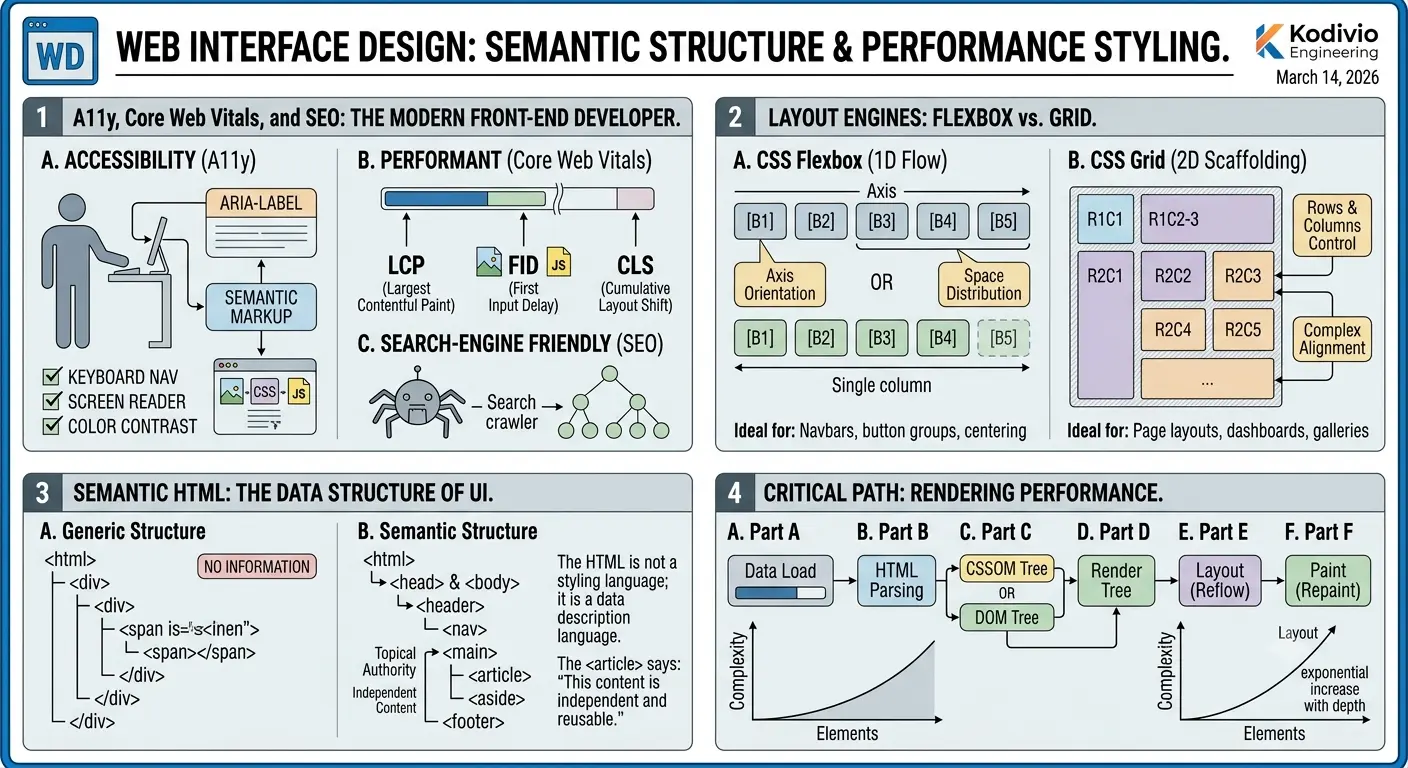
2. Layout Engines: Flex vs. Grid
Modern CSS is defined by two primary layout engines. Learning when to use which is the hallmark of a senior engineer.
- CSS Flexbox
1-Dimensional Flow
Best for distributing space along a single axis (row OR column). Ideal for navigation bars, button groups, and centering elements. It excels at flexible, fluid sizing.
- CSS Grid
2-Dimensional Scaffolding
Best for handling rows and columns simultaneously. Ideal for main page layouts, dashboards, and complex image galleries where items span multiple vertical and horizontal cells.
3. Container Queries: Component Autonomy
The biggest advancement in CSS in the last decade is Container Queries. Before, we used @media queries to change layouts based on the screen size. Now, we use @container to change layouts based on the size of the parent element.
This allows for "True Component Architecture." A card component can now look like a list when put in a narrow sidebar and look like a tile when put in a wide main area—all with the exact same CSS.
4. Performance: Optimized Render Paths
Your CSS directly impacts Core Web Vitals. Massive, uncompressed stylesheets block the browser's rendering engine, causing "Layout Shift" (CLS) and slow "Largest Contentful Paint" (LCP).
In production, every byte counts. Our Local-First CSS Minifier allows you to strip unnecessary whitespace and comments while maintaining 100% functional integrity. This ensures your users get a lightning-fast experience, even on low-bandwidth mobile connections.
5. Accessibility (A11y) as a Standard
An engineer's job is to build for everyone. This means:
- Using correct ARIA labels when semantic tags aren't enough.
- Ensuring Contrast Ratios meet WCAG 2.1 standards.
- Implementing Keyboard Navigation (the focus ring is your friend).
Conclusion: The Infrastructure of the Web
Mastering HTML and CSS is not just about the "look"—it is about the infrastructure of the web. By prioritizing semantic cleanliness, leveraging modern 2D/container layouts, and optimizing your delivery pipeline, you are building the foundation for a faster, more accessible, and more discoverable internet.
Web Architecture FAQ
The cascade resolves conflicting CSS declarations using three factors in order: (1) Origin and Importance (!important, user agent, author), (2) Specificity (ID > class > element), (3) Source Order (later declarations win). Most developers only think about specificity, ignoring origin rules entirely. The new @layer directive in CSS Cascade Layers provides explicit control over cascade ordering, dramatically reducing specificity wars in large codebases.
The :has() selector is CSS's first "parent selector" — it selects elements based on their descendants. Combined with :is() for grouping selectors without increasing specificity, these two features eliminate the need for many JavaScript-based conditional styling patterns. Example: form:has(input:invalid) styles the entire form when any input is invalid — previously only achievable with JavaScript.
The Critical Rendering Path is the sequence of steps the browser takes to convert HTML and CSS into pixels on screen: DOM construction → CSSOM construction → Render Tree → Layout → Paint. To optimize: inline critical CSS (above-the-fold styles) in the HTML head, defer non-critical CSS with media queries, and use font-display: swap to prevent font-loading from blocking text rendering.
CSS Custom Properties (--variables) are runtime values that cascade through the DOM and can be modified with JavaScript or media queries. Preprocessor variables (Sass $variables) are compile-time constants baked into the output CSS. Use custom properties for theming, responsive values, and anything that changes at runtime. Use preprocessor variables for structural constants like breakpoint values and math expressions that don't need to change after build.
CLS occurs when visible elements shift position after initial render. The primary causes are: images without explicit width/height attributes (use the aspect-ratio property), web fonts that trigger reflow (use font-display: optional), and dynamically injected content above existing elements (reserve space with min-height). Google considers CLS scores above 0.1 "poor" for Core Web Vitals ranking.
Beyond Grid and Flexbox, the 2026 landscape demands proficiency in: Cascade Layers (@layer), Container Queries (@container), Subgrid (grid-template-rows: subgrid), View Transitions API for animated page navigations, Scroll-Driven Animations (@keyframes with animation-timeline: scroll()), and the :has() relational pseudo-class. These features collectively eliminate the need for most CSS-in-JS libraries and complex JavaScript layout logic.
Optimize Your Production Pipeline
Ready to take your code to the next level? Use our local-first tools to audit, format, and minify your stylesheets.

AI & Web Development Specialists
The Kodivio team covers AI tools, automation, and modern web development based on real-world testing and hands-on experience.
Learn more about us →