How to Scan Your Docker Images for Vulnerabilities (Free Tools)
Learn how to find vulnerabilities in your Docker images before attackers do, using free open-source scanners like Trivy, Grype, and Docker Scout — with practical commands, CI/CD examples, and a hardening checklist.
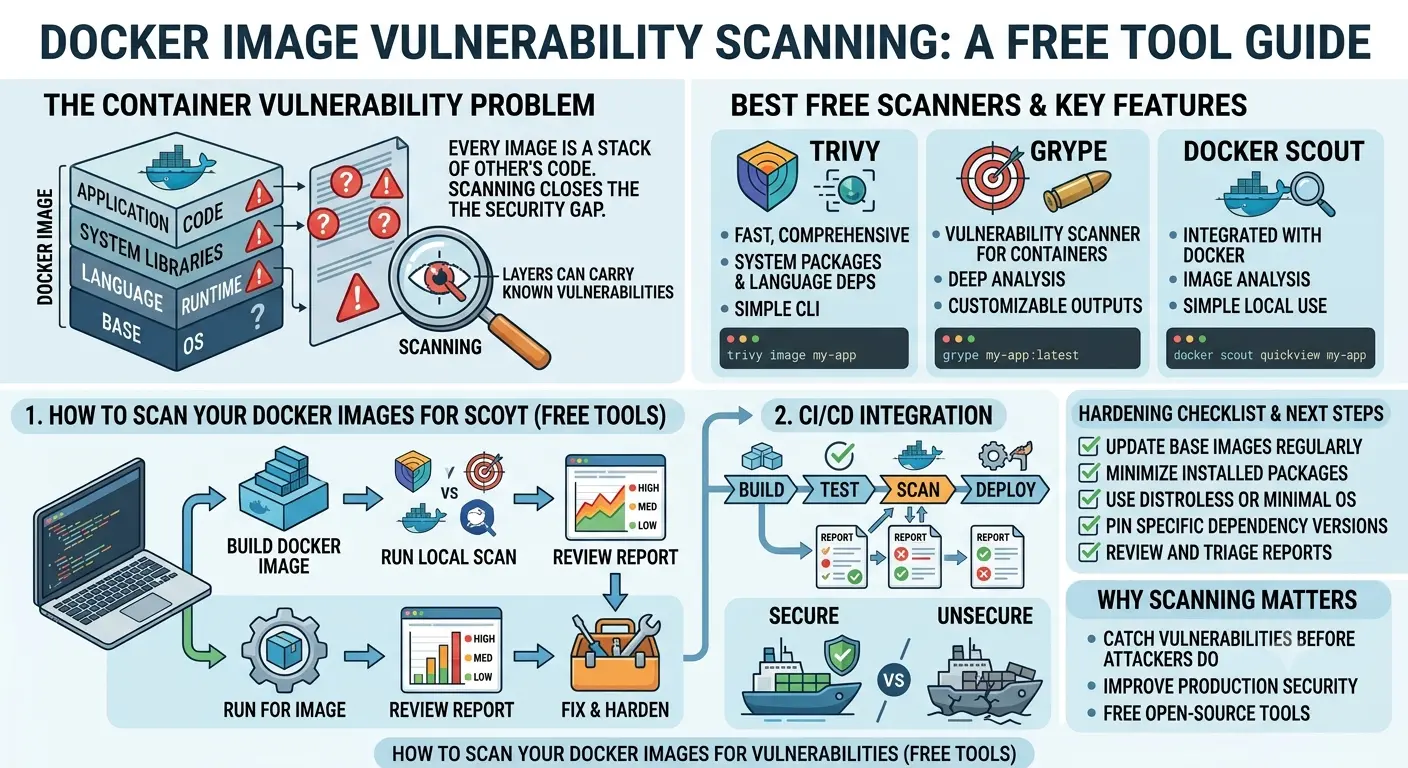
Every Docker image you build is a stack of someone else's code — a base OS layer, a language runtime, a handful of system libraries, and whatever packages your application depends on. Any one of those layers can be carrying a known vulnerability, and you'd never know it just by looking at aDockerfile. That's the gap image scanning closes.
The good news: you don't need an enterprise security budget to catch this stuff. A handful of free, open-source scanners can catch the vast majority of issues before an image ever reaches production. This guide walks through why scanning matters, the best free tools available, how to run them locally and in CI/CD, and how to actually act on what they find.
Why Docker Image Vulnerabilities Matter
A container isn't magically isolated from the vulnerabilities baked into it. If your base image ships an outdated OpenSSL library with a known remote code execution flaw, that flaw travels with every container built from it — across every environment, every deployment, every developer's laptop.
- Base images go stale fast. Even an image that was clean the day you pulled it can have new CVEs disclosed against it within weeks.
- Transitive dependencies hide risk. A vulnerability three layers deep in a dependency of a dependency is easy to miss without automated tooling.
- Supply chain attacks are increasingly common. Compromised or poorly maintained packages have been used as an entry point into otherwise well-secured environments.
- Compliance frameworks increasingly require it. Standards like SOC 2, PCI DSS, and various government frameworks expect evidence of routine container scanning.
The Best Free Docker Vulnerability Scanners
There's no single "best" scanner for every situation — each tool has a slightly different focus. Here's how the most popular free options compare.
| Tool | Best For | Notes |
|---|---|---|
| Trivy | All-around scanning: OS packages, app dependencies, IaC misconfigurations, and secrets | Fast, single binary, widely adopted, actively maintained by Aqua Security |
| Grype | Fast vulnerability matching against SBOMs | Pairs naturally with Syft for SBOM generation; simple CLI output |
| Docker Scout | Teams already using Docker Desktop or Docker Hub | Built into Docker CLI, generous free tier, good remediation suggestions |
| Snyk Container | Developers who want detailed fix guidance and IDE integration | Free tier limited by scan volume, strong developer experience |
| Clair | Self-hosted registry scanning at scale | More setup effort; often paired with Harbor or Quay registries |
For most individuals and small teams, Trivy is the easiest starting point — it's a single binary, requires no server or database setup, and covers OS packages, application dependencies, and misconfigurations in one tool.
Scanning an Image with Trivy
Install Trivy, then point it at any local or remote image:
# macOS
brew install trivy

# Debian/Ubuntu
sudo apt-get install trivy

# Scan an image
trivy image myapp:latest
Trivy's output lists each vulnerability by severity, the affected package, the installed version, and — critically — the fixed version if one is available. That last detail is what turns a scan report into an actionable to-do list rather than just a wall of red text.
To focus only on what matters for a release gate, filter by severity:
trivy image --severity CRITICAL,HIGH --exit-code 1 myapp:latestThe --exit-code 1 flag is what makes this useful in automation — it causes the command to fail (and therefore fail your build) when matching vulnerabilities are found.
Generating an SBOM with Syft and Scanning with Grype
A Software Bill of Materials (SBOM) is essentially a detailed inventory of everything inside your image — every package, every version, every dependency. Generating one separately from your scan has a real advantage: you can re-scan the same SBOM against updated vulnerability databases later without rebuilding or re-pulling the image.
# Generate an SBOM
syft myapp:latest -o json > sbom.json

# Scan the SBOM for vulnerabilities
grype sbom:sbom.json
This separation of "inventory" from "vulnerability matching" is increasingly considered best practice, since it lets you track exactly what changed between two versions of an image and re-check historical SBOMs against newly disclosed CVEs.
Using Docker Scout (Built Into the Docker CLI)
If you're already using Docker Desktop, Docker Scout is available without installing anything extra:
docker scout cves myapp:latestScout also offers a useful comparison command that shows exactly what changed — added, removed, or fixed vulnerabilities — between two image versions, which is handy for verifying that a base image update actually resolved the issues you expected it to.
docker scout compare myapp:latest --to myapp:previousWiring Scanning Into Your CI/CD Pipeline
Manual scans catch issues, but the real value comes from making scanning a required, automatic step before any image reaches a registry. Here's a minimal example using Trivy in a GitHub Actions workflow:
- name: Build image
  run: docker build -t myapp:${{ github.sha }} .

- name: Scan image
  uses: aquasecurity/trivy-action@master
  with:
    image-ref: myapp:${{ github.sha }}
    severity: CRITICAL,HIGH
    exit-code: '1'
With this in place, any pull request or merge that introduces a critical or high-severity, fixable vulnerability fails the pipeline automatically — no one has to remember to run a scan manually.
Setting Sensible Severity Thresholds
One mistake teams make when they first adopt scanning is failing builds on every single finding, including low-severity issues with no available fix. That approach burns out developers fast and trains people to ignore scan results entirely. A more sustainable policy looks something like this:
| Severity | Recommended Action |
|---|---|
| Critical / High (fix available) | Block the build until resolved |
| Critical / High (no fix yet) | Log and track, evaluate compensating controls |
| Medium | Track in backlog, patch on a regular cadence |
| Low / Informational | Review periodically, rarely worth blocking a release |
Reducing Vulnerabilities Before You Even Scan
Scanning tells you what's wrong; these habits reduce how much there is to find in the first place.
- Use minimal base images. Alpine, distroless, or slim variants ship far fewer packages — and far less attack surface — than full OS images.
- Pin your base image versions. Avoid
latesttags in production builds; pin to a specific digest so builds are reproducible and predictable. - Rebuild regularly, not just on code changes. An image with unchanged application code can still accumulate new CVEs in its base layers over time.
- Use multi-stage builds. Keep build tools and compilers out of your final runtime image entirely.
- Remove unnecessary packages and tools. Every extra utility installed is one more thing that can carry a vulnerability.
Putting It All Together: A Practical Workflow
- Scan locally during development with Trivy or Docker Scout before pushing changes.
- Generate an SBOM with Syft as part of your build process for traceability.
- Gate your CI/CD pipeline so builds fail automatically on critical or high-severity, fixable vulnerabilities.
- Schedule recurring scans of images already deployed, since new CVEs are disclosed continuously.
- Review and patch on a regular cadence, rather than only reacting when something breaks.
Frequently Asked Questions
Is Docker image scanning really free?
Yes. Tools like Trivy, Grype, and Syft are fully open source with no usage caps. Docker Scout and Snyk offer generous free tiers for individuals and small teams, with paid plans mainly aimed at larger organizations that need centralized dashboards and policy enforcement.
How often should I scan my Docker images?
At minimum, scan every image before it's pushed to a registry or deployed. Beyond that, schedule recurring scans of images already in production, since new vulnerabilities are disclosed daily even if the image itself hasn't changed.
Should I block a build just because a scanner finds a vulnerability?
Not automatically. Most teams set severity thresholds — for example, failing builds only on critical or high-severity, fixable vulnerabilities — to avoid blocking every release over low-risk or unpatched issues that have no fix available yet.
Do I still need scanning if I use a minimal base image?
Yes. Minimal base images like distroless or Alpine reduce your attack surface significantly, but application dependencies, language runtimes, and libraries you install on top can still introduce vulnerabilities that only a scan will catch.
The Bottom Line
You don't need a paid platform to keep vulnerable Docker images out of production. Trivy, Grype, and Docker Scout together cover local scanning, SBOM generation, and CI/CD gating without costing anything. The habit that matters most isn't which tool you pick — it's making scanning a required, automatic step in every build, not an occasional manual check.
Related guides

Cybersecurity & Tech Research Team
The Kodivio team covers cybersecurity best practices, threat analysis, and digital safety tools based on hands-on testing and industry sources.
Learn more about us →