
How to Detect and Remove a Compromised npm Package from Your Project
Supply-chain attacks through npm are on the rise. One rogue package can silently steal credentials, exfiltrate environment variables, or backdoor your entire application. Here's exactly how to detect, confirm, and eliminate the threat — fast.
Why npm Supply-Chain Attacks Are a Real Threat
The npm registry hosts over 2.5 million packages. That reach is exactly what makes it a high-value target. Attackers don't need to break into your codebase directly — they just need to compromise one dependency that your project trusts.
The mechanics are straightforward and sobering. A popular package maintainer's account gets hijacked. A new version is published that looks identical to the last one — except for a few lines of obfuscated code quietly added to a postinstall script. Every project that runs npm install next pulls that code down and executes it automatically.
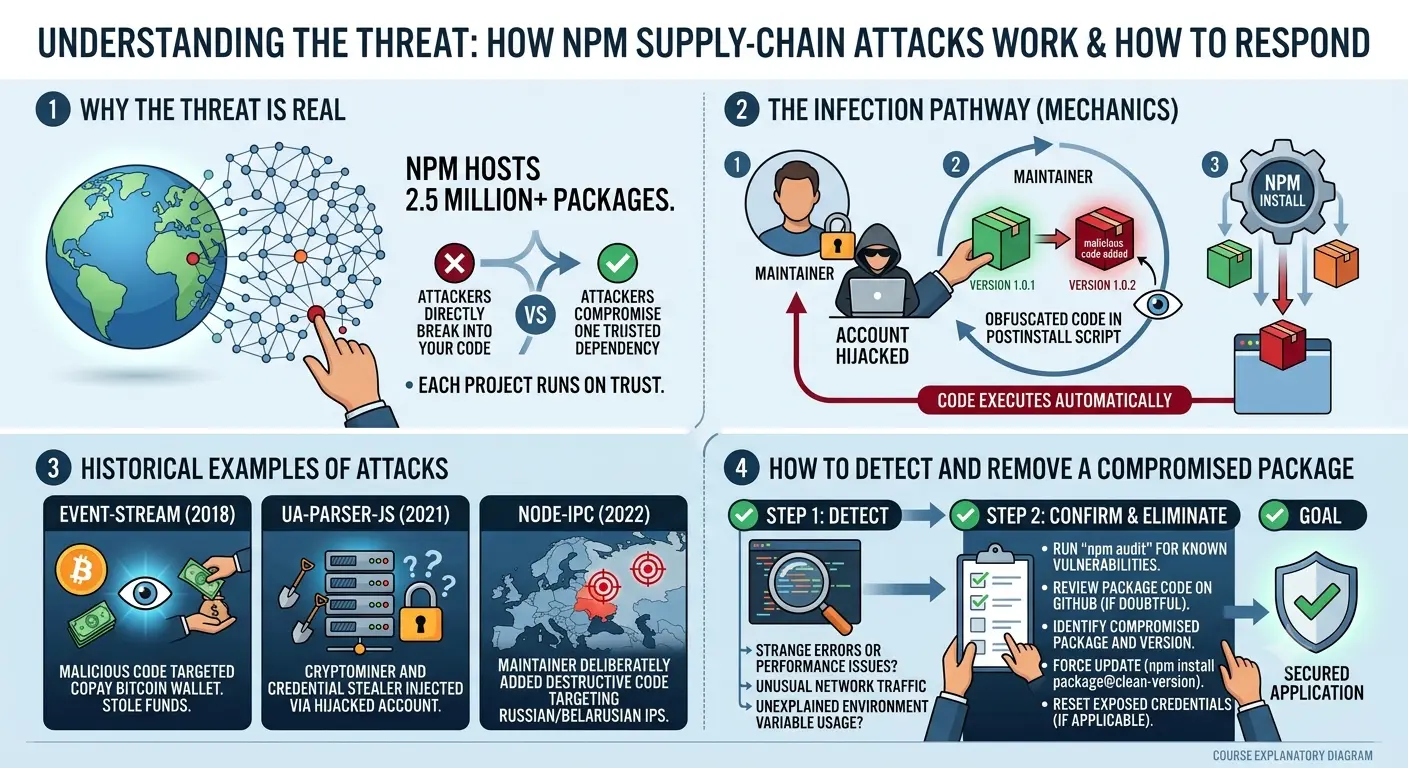
event-stream (2018)
Malicious code targeted the Copay Bitcoin wallet to steal funds.
ua-parser-js (2021)
Cryptominer and credential stealer injected via hijacked maintainer account.
node-ipc (2022)
Maintainer deliberately added destructive code targeting Russian/Belarusian IPs.
These aren't theoretical scenarios — they're confirmed incidents that affected thousands of projects.
Warning Signs a Package May Be Compromised
Knowing what to look for is half the battle. Here are the most reliable red flags, whether you've already installed a package or are evaluating one for the first time.
Behavioural red flags at runtime
- ⚠Unexpected outbound network requests to unknown hosts
- ⚠Environment variables being read and forwarded externally (e.g. AWS_SECRET_ACCESS_KEY, DATABASE_URL)
- ⚠New files appearing in your project directory after install
- ⚠Scripts running at install time that weren't there before
- ⚠CI/CD pipelines slowing down or making unexpected external calls
Repository and registry red flags
- ⚠A sudden version bump with no changelog or commit history to explain it
- ⚠Maintainer account changed or ownership transferred recently
- ⚠Source repo archived, deleted, or pointing somewhere new
- ⚠Package description or README changed significantly
- ⚠Download count spiked or dropped sharply after a specific version
How to Audit Your Dependencies
Don't wait for something to go wrong. Build dependency auditing into your regular workflow using the tools below.
1. Built-in: npm audit
Your first stop should always be npm's own audit command. It cross-references your dependency tree against the GitHub Advisory Database and flags known vulnerabilities.
# Audit all dependencies
npm audit

# Auto-fix where safe
npm audit fix

# Force-fix (use carefully — may introduce breaking changes)
npm audit fix --force
2. Deep inspection: better-npm-audit and audit-ci
The built-in audit is a good baseline, but it only catches known vulnerabilities. For CI pipelines, use audit-ci to fail builds when high-severity issues are detected:
npx audit-ci --high
3. Supply-chain analysis: socket.dev
Socket goes further than CVE databases — it detects behavioral issues like packages that install scripts, access the network, or read environment variables at install time. It integrates directly with GitHub and npm.
npx @socketsecurity/cli info <package-name>
4. Lock file integrity: npm ci
In production and CI environments, always prefer npm ci over npm install. It installs exactly what's in your package-lock.json, refuses to update it, and fails if there's any mismatch.
# Use in CI to enforce exact locked versions
npm ci
Investigating a Suspicious Package
Found something suspicious? Don't just uninstall blindly. Confirm the threat first so you know the full scope of the damage.
Step 1 — Read the actual package source
Navigate to the package in your node_modules folder and read it. Focus on package.json (check the scripts field), then the main entry file.
# View install scripts and main entry
cat node_modules/<package-name>/package.json | grep -A 10 '"scripts"'

# Search for outbound HTTP calls in the package source
grep -r "http|fetch|axios|request|child_process|exec|eval" node_modules/<package-name>/
Step 2 — Check the npm registry directly
Compare what you have installed with the published registry entry. Look at the publish date and who published each version.
# See all versions and publish timestamps
npm view <package-name> time --json

# See who published each version
npm view <package-name> --json | grep '"_npmUser"'
Step 3 — Compare against a known-good version
If you suspect a specific version was tampered with, diff it against the previous known-good version using npm-diff:
npx npm-diff <package-name>@<good-version> <package-name>@<suspect-version>
💡 What to look for in the diff
- New
require('http'),require('net'), orrequire('child_process')calls - Base64-encoded strings passed to
eval()orFunction() - Environment variable reads (
process.env) followed by network calls - New
postinstall,preinstall, orinstallscripts inpackage.json - Code obfuscation or minification added to previously readable source
Safely Removing a Compromised Package
Once you've confirmed a package is malicious, move quickly and methodically. The goal is to remove the threat without breaking your application.
Isolate first
If you're on a shared or production server, take the affected environment offline or block outbound traffic immediately. Don't let it keep calling home while you investigate.
Remove the package
This removes it from node_modules and updates package.json and the lock file.
npm uninstall <package-name>
Nuke node_modules entirely
A fresh install ensures no stale or orphaned files from the compromised package remain.
rm -rf node_modules package-lock.json
npm install
Scan for residual traces
Make sure no other file in your project still imports or references the removed package.
grep -r "<package-name>" . --include="*.js" --include="*.ts" --include="*.json"
Find and use a safe replacement
Check if a clean version exists (often the version just before the compromised one), or find an alternative package with a better security posture.
npm install <package-name>@<last-clean-version>
Incident Response Checklist
Removing the package is necessary, but it's not the end of the story. If the compromised package ran — especially in production — you need to assume a breach and act accordingly.
| Action | Why | Priority |
|---|---|---|
| Rotate all secrets and API keys | Assume any env variable the package could read was exfiltrated | 🔴 Critical |
| Revoke and reissue tokens | Session tokens, JWTs, OAuth credentials — all of them | 🔴 Critical |
| Review access logs | Check cloud provider, DB, and CDN logs for anomalous requests | 🔴 Critical |
| Audit git history | Look for any pushed commits or modified files you didn't author | 🟠 High |
| Check CI/CD pipeline | Inspect build logs for unexpected outbound calls or artifacts | 🟠 High |
| Notify affected users | If user data was exposed, notify per your legal obligations (GDPR, etc.) | 🟠 High |
| Report to npm | Use npmjs.com/support to report the malicious package | 🟡 Medium |
| Document the timeline | Write up the incident for internal post-mortem | 🟡 Medium |
How to Prevent Future Compromise
Reactive security is expensive. A few proactive habits dramatically reduce your attack surface before a bad package ever lands in your project.
Lock your dependency versions
Use exact versions instead of ranges in package.json, and always commit your package-lock.json. This ensures the same code gets installed every time, everywhere.
# .npmrc — save exact versions by default
save-exact=true
Disable postinstall scripts for untrusted packages
Most malicious packages rely on postinstall scripts to execute their payload. You can disable all install scripts globally (then opt-in for packages that genuinely need them):
# .npmrc — disable install scripts globally
ignore-scripts=true
Automate auditing in CI/CD
Make security checks a mandatory gate in your pipeline. A failing audit should block the build before it ever reaches production.
# GitHub Actions example
- name: Audit dependencies
  run: npx audit-ci --high
Apply the principle of minimal dependency
Every package you add is a new attack surface. Before installing anything, ask: Do I actually need this? Could I implement this utility in 10 lines of code instead of trusting a third-party package with access to my environment?
Use a private registry with allowlisting
For enterprise or high-security projects, proxy npm through a private registry like Verdaccio, Artifactory, or GitHub Packages. This lets you allowlist approved packages and versions, and adds a human review step before new packages enter your build.
Enable npm provenance and integrity checks
npm now supports signed provenance — packages published with proof of where and how they were built. Check for provenance before adding a new dependency:
npm view <package-name> --json | grep provenance
Quick-reference summary
- ✓Run npm audit regularly and block high-severity issues in CI.
- ✓Prefer npm ci over npm install in production and CI environments.
- ✓Inspect any package showing unexpected network calls, env var reads, or install scripts.
- ✓On confirmed compromise: rotate secrets immediately, then remove and reinstall clean.
- ✓Always check logs and downstream systems — a rogue package may have already called home.
- ✓Reduce your dependency count. Every package you don't need is an attack you've already prevented.
Related guides

Cybersecurity & Tech Research Team
The Kodivio team covers cybersecurity best practices, threat analysis, and digital safety tools based on hands-on testing and industry sources.
Learn more about us →